
O Print Watch4.7.0.3223 - Download
You'll be able to download in few seconds.
Publisher Description
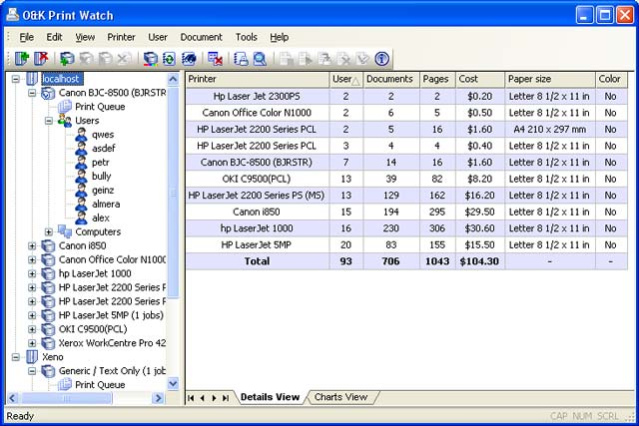
Print manager to control and audit printing costs in your organization. O Print Watch helps managers learn about the true cost of printing in the company by monitoring all print jobs regardless of whether they are submitted onto a local or networked printer. Supporting multiple printing devices and unique printing pricing combined with per-user quotas and audit of all print jobs makes it possible to cut down printing costs and save on printing.
O Print Watch is a powerful printing audit tool. Keeping track on print jobs and paper usage for all local and network printers, the printer monitor records who used a particular printing device, what and when was printing. Electronic images of all print jobs can be saved for managerial review. O Print Watch track exact user names, date and time, and records the exact number of pages and printing parameters for each printing job. The high precision page counter allows accounting all printing jobs up to the last page.
You can access the logs and reports from any network-connected PC in your organization with the Web-based interface. O Print Watch supports a variety of databases, and offers exporting of HTML reports.
Controlling who, when, and how can use various printers in your organization is easy with O Print Watch. It is possible to set per-user and group-based quotas, and limit print jobs for any printer, user or users group. Printing jobs can be allowed, denied, or held for a review based on quotas and numerous parameters such as the size and cost of the printing job. When assigning specific printing costs to each printer, it is possible to restrict print jobs based on the printing cost. Finally, it is possible to restrict printing based on keywords contained in the name of the document.
The printing management tool supports an unlimited number of printers, and runs on Windows NT4, 2000, XP, Vista, Windows 7, and Windows Server 2003 and 2008.
About O Print Watch
This Printer program is available in English, Portuguese, Russian. It was last updated on 29 September, 2026. O Print Watch is compatible with the following operating systems: Windows, Windows-mobile.
The company that develops O Print Watch is O Software. The latest version released by its developer is 4.7.0.3223.
The download we have available for O Print Watch has a file size of 8.4 MB. Just click the green Download button above to start the downloading process. The program is listed on our website since 2013-09-23 and was downloaded 0 times. We have already checked if the download link is safe, however for your own protection we recommend that you scan the downloaded software with your antivirus. Your antivirus may detect the O Print Watch as malware if the download link is broken.
How to install O Print Watch on your Windows device:
- Click on the Download button on our website. This will start the download from the website of the developer.
- Once the O Print Watch is downloaded click on it to start the setup process (assuming you are on a desktop computer).
- When the installation is finished you should be able to see and run the program.
Program Details
System requirements
Download information
Pricing
Version History
version 4.7.0.3223
posted on 2013-09-23
Fixed error in PCL6 image decoder.
Fixed error in SQL database creation script.
Fixed error in database deadlock after entering license.
Fixed error in a getting printers list on some print-cluster configurations.
Fixed error in O Print Watch Server freezing on start in some cases.
Disclaimer
External Download
We do not host O Print Watch on our servers. We did not scan it for viruses, adware, spyware or other type of malware. This app is hosted by the software publisher and passed their terms and conditions to be listed there. We recommend caution when installing it.
The external download link for O Print Watch is provided to you by apps112.com without any warranties, representations or guarantees of any kind, so access it at your own risk.
If you have questions regarding this particular app contact the publisher directly. For questions about the functionalities of apps112.com contact us.
